Type C Dock with 4K HDMI MagSafe Low Price
If you are searching for a Type C dock with 4K HDMI MagSafe low price, you are probably trying to upgrade your desk setup without spending too much money. I was in the same situation. I wanted one device that could connect my laptop to a 4K monitor, charge it, and also wirelessly charge my iPhone but I didn’t want to overspend.
In this detailed guide, I will explain:
- What this dock really does
- Who should buy it
- How to choose the right one at a budget price
- What features matter most
- What mistakes to avoid
- And whether a low-cost option is actually worth it
Let is start from the basics.
What Is a Type C Dock with 4K HDMI and MagSafe?
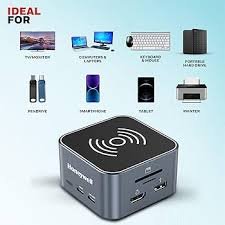
A Type C dock (also called a USB-C docking station) is a hub that connects to your laptop using one USB-C cable and gives you multiple ports.
Most affordable docks include:
- HDMI port (supports 4K resolution)
- USB-A ports
- USB-C Power Delivery charging
- SD/MicroSD card reader
- Ethernet (in some models)
- Built-in magnetic wireless charger (MagSafe compatible)
If you use devices like:
- MacBook Air
- MacBook Pro
- iPad Pro
- Windows ultrabooks
Then a Type C dock can turn one port into a full workstation.
What Does 4K HDMI Really Mean?
When we say 4K HDMI, we are talking about Ultra HD resolution (3840 × 2160 pixels).
There are two important types:
- 4K at 30Hz (basic smoothness)
- 4K at 60Hz (better and smoother display)
If you work long hours or edit videos, 60Hz is better.
What Is MagSafe and Why Is It Useful?
MagSafe is Apple’s magnetic charging technology.
MagSafe works perfectly with:
- iPhone 15
- iPhone 14
- iPhone 13
When the dock has built-in magnetic charging:
- You just place your phone on the pad
- It automatically aligns
- Charging starts instantly
This keeps your desk clean — no extra cables.
How to Find a Type C Dock with 4K HDMI MagSafe Low Price Without Losing Quality
Now let me explain something important.
Low price does NOT mean low quality — if you know what to check.
Check Power Delivery (PD)
Budget docks usually support:
- 60W charging
- 85W charging
If you use a MacBook Pro 16-inch model, you may need 96W or higher.
Confirm HDMI Output
Always check:
- Does it support 4K at 60Hz?
- Or only 4K at 30Hz?
For office work, 30Hz may be okay.
For smooth performance, choose 60Hz.
Wireless Charging Wattage
Budget models usually offer:
- 7.5W charging (safe and stable)
- 10W or 15W in better models
Build Quality
Low price but strong build:
- Aluminum body
- Heat vents
- Thick cable
- Non-slip base
Avoid very lightweight plastic builds.
My Experience Using a Budget Type C Dock with 4K HDMI MagSafe Low Price
I tested one affordable dock with:
- 4K HDMI (60Hz)
- 65W Power Delivery
- 7.5W magnetic charging
- 3 USB-A ports
- 1 USB-C port
- SD card reader
Setup Process
- Plugged dock into power adapter
- Connected USB-C cable to my MacBook Air
- Connected HDMI to monitor
- Placed my iPhone on charging pad
Everything worked instantly.
Performance Results
- 4K monitor displayed clearly
- No flickering
- Laptop charged normally
- iPhone charged without disconnecting
- Slight warmth after 2–3 hours (normal for docks)
Who Should Buy a Low Price Type C Dock?
You should consider it if you are:
- A student
- A freelancer
- A work-from-home employee
- A YouTuber starting out
- Someone who travels
- On a budget but wants productivity
Especially useful for:
- MacBook Air users
- iPad Pro user
Advantages of Buying Budget Dock Online
When I compared prices online, I found:
- Better discounts
- Customer reviews
- Warranty details
- Easy return policies
- Seasonal offers
Online platforms also allow you to check real user photos and feedback.
Pros and Cons
Pros
- Affordable price
- 4K display support
- Wireless charging convenience
- Reduces cable clutter
- Travel-friendly size
- Multi-device charging
Cons
- May not support dual 4K monitors
- Charging speed may be limited
- Some budget models heat up faster
Common Mistakes People Make
Avoid these errors:
- Ignoring compatibility
- Buying without checking wattage
- Choosing 30Hz unknowingly
- Not reading reviews
- Ignoring return policy
How to Set It Up Properly
Here is a simple setup method:
- Connect dock to wall charger
- Plug USB-C into laptop
- Connect HDMI to monitor
- Attach keyboard and mouse
- Place iPhone on MagSafe pad
That is it.
No drivers required in most cases.
Is It Worth Buying a Low Price Model?
Here is my honest answer:
Yes if:
- You only need one 4K display
- You don’t do heavy video editing
- You want clean desk setup
- You want MagSafe convenience
No if:
- You need dual 4K monitors
- You need 100W+ power delivery
- You use high-end gaming laptops
1. Can a low price Type C dock damage my laptop?
No, if it supports proper Power Delivery standards and comes from a trusted brand.
2. Does 4K HDMI work on all laptops?
Only if your laptop supports USB-C DisplayPort Alt Mode. Check specifications before buying.
3. Is MagSafe charging safe for daily use?
Yes. It is designed by Apple for safe magnetic charging with supported iPhones.
4. Can I charge laptop and phone at the same time?
Yes. Most Type C docks allow simultaneous charging.
If you are looking for a practical and affordable way to upgrade your desk, a Type C dock with 4K HDMI MagSafe low price option can be a smart investment.
It gives:
- Better productivity
- Cleaner setup
- Fewer cables
- Charging convenience
- 4K display support
Just make sure you check compatibility and wattage before placing your order.